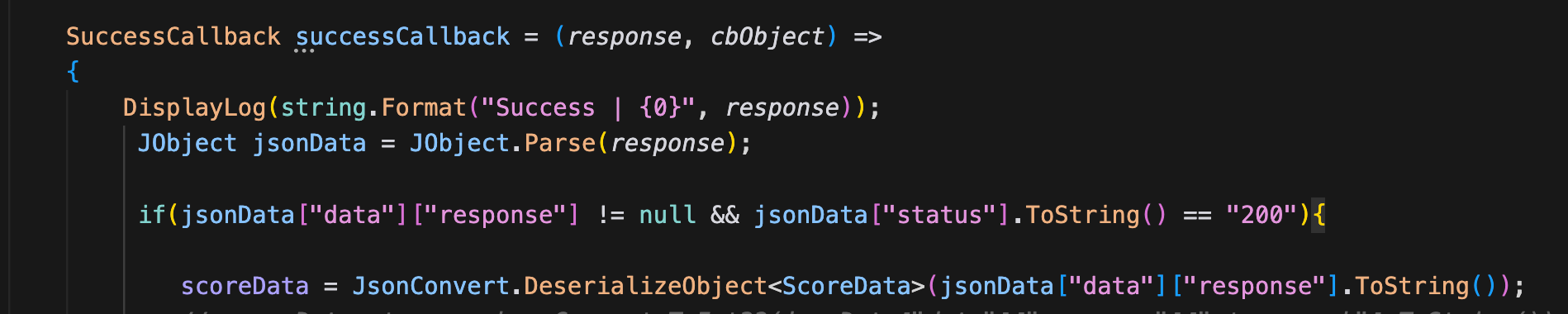
@JasonL It works! Thank you!
L
LEE JONG GUN
@LEE JONG GUN
Posts
-
Bulk import / API for registering in-app products -
Bulk import / API for registering in-app productsHi brainCloud team,
I'm running several live mobile games on brainCloud, and each of them has a fairly large catalog of in-app products (dozens of items per game across iOS and Android).
Currently, the only way to register products is to add them one by one in the Portal (Design → Marketplace → Products), filling in the product ID, store IDs, price data, etc. for every single entry. When launching a new game or adding a batch of new packages, this takes a lot of time and is error-prone.
It would be a big help if brainCloud provided one (or both) of the following:
-
Bulk import in the Portal – upload a CSV/JSON file containing product definitions (product ID, title, category, iOS/Google product IDs, prices, etc.) to create or update multiple products at once.
-
An admin/S2S API for product management – endpoints to create, update, and delete products programmatically, so we can keep the catalog in version control and sync it with the store listings via a script.
Even a simple export/import of the existing product table would already save a lot of manual work.
Thanks for considering this!
-
-
[Feature request] Support multiple Apple client IDs (aud values) for AuthenticateAppleIt works! Thank you
-
Two edge cases we ran into with the bundled JsonFx parserHello!
While storing richer JSON documents through CustomEntityService we ran into two
edge cases in the bundled JsonFx parser (Runtime/JsonFx/JsonReader.cs) that we thought
might be worth sharing, in case other Unity developers hit them too.1. InvalidCastException when an array-of-arrays mixes inner array shapes (Unity/Mono)
Passing this document as the dataJson of CustomEntityService.CreateEntity throws
before the request is even sent:{ "p": [ [ {"x": 1} ], [] ] }Also reproduces when the second inner array is all nulls instead of empty.
ReadArray infers a dictionary-array type from the first inner array, then upgrades
arrayItemType to object-array on the mismatched one, and the final
ArrayList.ToArray call throws under Mono's Array.Copy.
A small fallback resolved it for us — wrapping that ToArray call in try/catch and
falling back to the plain object-array ToArray.2. Integers with 19+ digits (18+ when negative) silently lose precision
ReadNumber routes integers with precision of 19 or more to Double.Parse, so a value
like long.MaxValue (9223372036854775807) becomes 9.223372036854776E18 with no error.
Note that precision includes the minus sign, so negative 18-digit integers take the
double path as well. This range is easier to hit than it may look — snowflake-style
IDs (Discord, Twitter/X) are 18-19 digit integers, and long-running idle-game
currencies get there too.What worked for us was raising the threshold to "precision < 29":
- The integer path already parses through Decimal.Parse, so only the boundary changes.
- 28 digits is the largest length Decimal.Parse can always hold exactly
(decimal.MaxValue is about 7.9e28, a 29-digit number, so some 29-digit values
would overflow — hence 29 is the widest safe boundary). - Since precision counts the sign, negative values are effectively capped at 27
digits — still comfortably covering the full long range. - Values that fit in long still come back as long; 20-28 digit values fall through
to decimal, which JsonWriter already emits as a quoted string when it exceeds
IEEE754 range — so precision is preserved end to end. - 29+ digit integers keep the existing double behavior.
We're currently carrying both changes as local patches.
Thank you!
-
[Feature request] Support multiple Apple client IDs (aud values) for AuthenticateAppleHi brainCloud team,
We're shipping a cross-platform game (iOS + Android) with Sign in with Apple, and we've hit a limitation with AuthenticateApple.
Our setup:
- iOS uses the native Sign in with Apple SDK → the identity token's
audclaim is our App/Bundle ID (e.g. com.mygame.app) - Android has no native Apple SDK, so it uses Apple's web OAuth flow → the identity token's
audis our Services ID (e.g. com.mygame.app.signin)
Apple requires these to be two different identifiers — a Services ID cannot be the same string as the App ID. And Apple guarantees the same
sub(user ID) across both, since the Services ID is grouped under the same Primary App ID.The problem:
AuthenticateApple validates the token'saudagainst the single Apple client ID configured in the portal. With only one value allowed, one platform always fails with reason code 40307. So it's currently impossible to support Sign in with Apple on both iOS (native) and Android (web) against the same brainCloud app using the standard Apple authentication.Our current workaround:
We moved both platforms to AuthenticateExternal with a cloud code script that fully validates the token (RS256 signature against Apple's JWKS, iss/exp/sub checks) and accepts bothaudvalues. It works, but it means giving up the built-in Apple identity type and maintaining our own validation script.An important caveat with this workaround:
External identities and Apple identities are separate identity types in brainCloud. This means the External Auth workaround is only viable for games that have NOT yet shipped Apple login — existing players who signed up via AuthenticateApple would end up on different profiles when switching to AuthenticateExternal, even though their Applesubis identical. For a live service with existing Apple-authenticated users, migrating requires attaching a second identity to every active player and maintaining both auth paths during the transition — which makes this workaround effectively impractical for already-launched games. Native multi-client-id support in AuthenticateApple would solve this cleanly.Feature request:
Please allow the Apple configuration in the portal to accept multiple client IDs (e.g. a comma-separated list, or separate fields for Bundle ID and Services ID), and have AuthenticateApple validateaudagainst that list. This is a standard requirement for any cross-platform game supporting Sign in with Apple on Android — every backend that validatesaud(Firebase, Supabase, etc.) supports a list of accepted client IDs for exactly this reason.Is this something that could be added to the roadmap? And is there any existing way to achieve this with AuthenticateApple that we've missed?
Thanks!
- iOS uses the native Sign in with Apple SDK → the identity token's
-
[Feature Request] Design > Segments – Condition for missing attributes (or segment membership as an alternative)Hello,
I'd like to request a feature for the Segments configuration under the Design section.
Currently, when setting up segment criteria based on player attributes, it seems that a player can only be matched if the attribute actually exists on their profile. However, there is no way to define a condition for players who do NOT have a specific attribute (i.e., the attribute is missing / has never been set).
Alternatively, this could also be solved with a segment membership condition — for example, "player is a member of Segment X" or "player is NOT a member of Segment X". With this, I could create a segment of players who have the attribute, and then simply exclude that segment to get the same result as an "attribute does not exist" condition.
So either of the following would cover this use case:
- An operator like "does not exist" (or "is not set") for player attribute conditions
- A condition based on segment membership: "is in segment" / "is not in segment"
If there is already a workaround for this, please let me know.
Thank you!
-
Segment Code Bug Report@JasonL At the time I reported this, that field was locked too, so it couldn't be edited — but I've now confirmed that it's editable.
-
Segment Code Bug Report@JasonL Thanks for the update, and for getting this fixed.
One follow-up: now that
_copyis auto-appended, the resulting code can
exceed the 12-character limit, and in that case the clone still can't be
saved. For example, a code that's already 8+ characters will go over the
limit once_copyis added.Ideally, the code field should be editable during the clone step itself,
so the user can set a valid, unique code up front rather than relying on
an auto-generated suffix that may already break the length limit. -
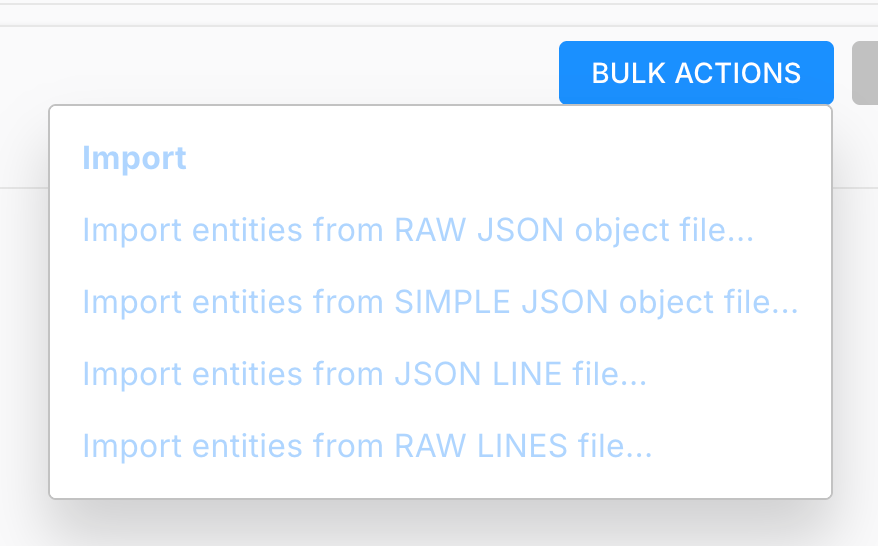
[Feature Request] Bulk actions for Custom Entities in the User tab@Paul-Winterhalder Sorry, I think I uploaded the wrong screenshot earlier, which may have
caused some confusion.Import isn't really my main use case — export is what I need most.
I regularly analyze a specific user's backup history, and being able to
bulk export that user's Custom Entities directly from the User tab would
make that workflow much smoother. Right now I have to go through the
Global tab to do any bulk operation, even when I'm only looking at one
user's data. -
[Feature Request] Bulk actions for Custom Entities in the User tabHi team,
I'd like to request a usability improvement for Custom Entities in the Design portal.
Currently, when I access a player's Custom Entities through the User tab (User Monitoring > Custom Entities for a specific user), there are no bulk actions available. To perform bulk operations on Custom Entities, I have to go to the Global tab instead.
It would be really helpful if the same bulk action functionality available in the Global tab could also be added to the User tab. This would let us manage a specific user's Custom Entities much more efficiently without switching contexts.
Thanks for considering this!
-
Segment Code Bug ReportHello
A "code" field was recently added to Segments. When using the Clone function, the code is also carried over (copied as-is) into the cloned segment, which prevents the clone from being saved.
Since the code value should be unique, the cloned segment ends up with a duplicate code and cannot be saved.
-
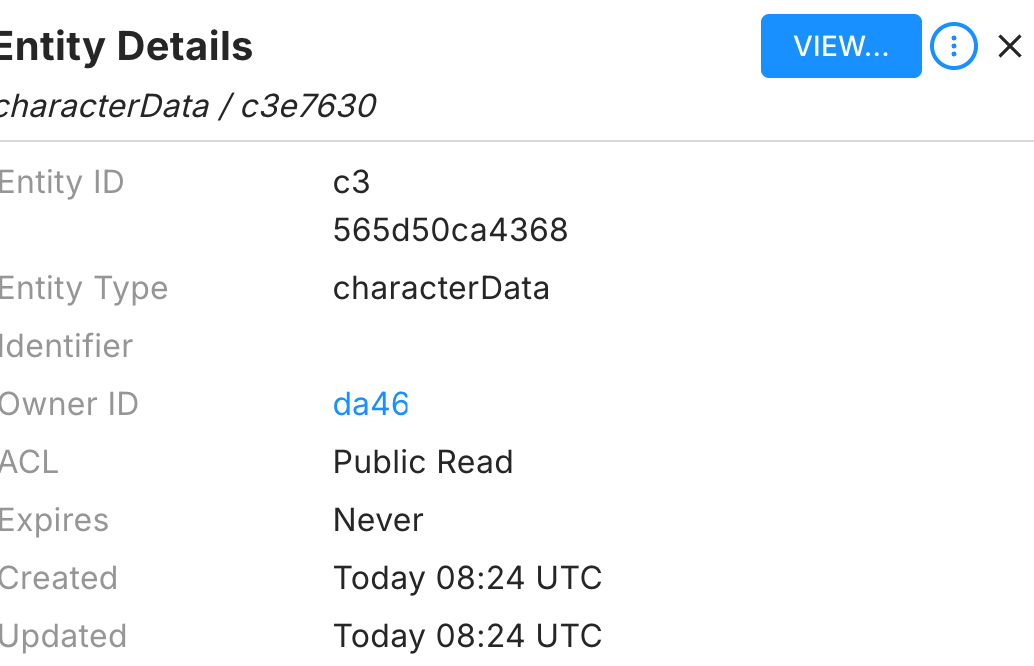
[Feature Request] Add "Open in New Window" option for Owner ID in Custom Entity viewHi team,
In the BrainCloud portal, when viewing a Custom Entity and clicking on the Owner ID, the page navigates away from the current entity view immediately. This is inconvenient when I want to quickly check the owner's profile while keeping the entity I was inspecting open for reference.
Previously, you added an "Open in new window" option for player entries in the Leaderboard list, which has been extremely helpful for cross-referencing data without losing context. It would be fantastic if the same "Open in new window" option could be added to the Owner ID link in the Custom Entity view as well.
This small addition would significantly improve the workflow when investigating user data and debugging issues across multiple entities.
Thanks!
-
Newtonsoft.Json fails to deserialize integer fields after BrainCloud SDK upgrade 5.9.3Symptom
After updating from 5.9.2 to 5.9.3, iOS/iPadOS experiences gradual performance degradation during extended play sessions, eventually leading to app termination
This issue did not occur on 5.9.2
Suspected Code
In BrainCloudComms.cs - HandleResponseBundle, the following line was added in 5.9.3:jsonData = JsonWriter.Serialize(JsonReader.Deserialize(jsonData));
Concerns
This performs a full deserialize → reserialize on every API response
Immediately after, DeserializeJsonBundle parses the same data again — effectively parsing every response twice
Each response generates a large number of temporary objects (Dictionary, List, boxed values, strings) that are immediately discarded
On iOS with IL2CPP (Boehm GC), could this repeated allocation/deallocation pattern cause managed heap growth over time?
Question
Could this code potentially contribute to memory-related issues on iOS during extended play sessions? -
Newtonsoft.Json fails to deserialize integer fields after BrainCloud SDK upgrade 5.9.3@Michael-Costa
The second option seems too narrow in scope for us, since it would
require us to apply it individually to each affected field, which
is not very practical in our case.With the first approach, the raw response is now being normalized
back to the same format we were seeing in 5.9.2, so we will proceed
with that as our workaround for now.Thank you
-
Newtonsoft.Json fails to deserialize integer fields after BrainCloud SDK upgrade 5.9.3string responseData = JsonParser.GetString(response, "data", "response"); if (!string.IsNullOrEmpty(responseData) && JsonParser.GetValue<int>(response, "status") == 200){ ScoreData3 scoreData = JsonReader.Deserialize<ScoreData3>(responseData); Debug.LogError(scoreData.stage_rank); >>WORKING Debug.LogError(scoreData.tier);>>WORKINGWe tested using the method you suggested, and with that approach
the double values started coming through as integers correctly.However, another issue appeared because we are using Obscured
Values in our project.When deserializing classes that contain Obscured types, those
fields are not converted correctly with this method.The error we get is:
InvalidCastException: Invalid cast from 'System.String'
to 'CodeStage.AntiCheat.ObscuredTypes.ObscuredString'.If we switch back to using a JsonConverter, the original double
problem happens again.Currently we resolve the Obscured type conversion using:
JsonConvert.DefaultSettings = () =>
new JsonSerializerSettings {
Converters = { new ObscuredTypesNewtonsoftConverter() }
};So my question is: does JsonReader provide a way to apply a
converter globally in a similar way, like JsonConvert.DefaultSettings? -
Newtonsoft.Json fails to deserialize integer fields after BrainCloud SDK upgrade 5.9.3The error we are seeing is:
JsonReaderException: Input string '4.0' is not a valid integer. Path 'tier', line 2
I tried the approach you suggested.
I parsed the response with JObject first and then
deserialized it again using JsonConvert.DeserializeObject.However, the error remains the same.
JsonReaderException: Input string '4.0' is not a valid integer.
It appears that the raw response value is already coming
through as a double (e.g. 4.0). When Newtonsoft.Json tries
to deserialize it into an int field, it fails.So simply passing the response through a
serializer/deserializer step does not seem to resolve the
issue in this case. -
Newtonsoft.Json fails to deserialize integer fields after BrainCloud SDK upgrade 5.9.3@Paul-Winterhalder Thanks for the clarification.
At the moment, I have not finished retesting everything yet
because I am handling several other tasks in parallel.
However, to give you an accurate answer, I am currently
reinstalling and testing again on 5.9.3.For reference, this issue is not occurring with LitJson on
our side. The deserialization error is happening with
Newtonsoft.Json.JsonConvert.More importantly, the root problem is not just which JSON
library is being used. The actual issue is that the raw
response itself is already coming through differently.
Before, this value came through as an integer, but in 5.9.3
it is coming through as a double-form value such as 7.0.So from our perspective, the problem starts at the raw
response level, before deserialization into our class. -
Newtonsoft.Json fails to deserialize integer fields after BrainCloud SDK upgrade 5.9.3Ok I will try Thank you!
-
Request: Improve Leaderboard Editing UX (Success Popup Blocks Buttons)There are multiple leaderboards in the game separated by region, but aside from the region itself, they all use the same settings.
When creating them initially, cloning works fine. However, after they have been created, if I need to adjust various options, I have to edit each leaderboard one by one.
The main problem is that every time I save a change, the “Updated successfully” popup appears and covers the edit button, which makes consecutive edits across multiple leaderboards very inconvenient.
It would be much more efficient if there were a way to edit multiple leaderboards with identical settings at the same time. At the very least, moving the success popup to a location where it does not block the button would greatly improve usability.
-
Request: Improve Leaderboard Editing UX (Success Popup Blocks Buttons)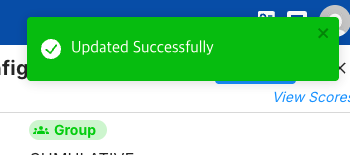
When updating multiple leaderboards consecutively, the current UX becomes quite inconvenient.
Each time a leaderboard is updated, an “Updated Successfully” popup appears. The issue is that this popup shows up in the top-right area, which is also where the Edit buttons and most of the controls are located.
Because of this, the popup covers the edit buttons, and instead of continuing the workflow, the user has to close the popup first before editing the next leaderboard. When several leaderboards need to be updated in sequence, this becomes unnecessarily repetitive and slows down the process.
It would significantly improve usability if one of the following changes could be considered:
Move the success notification to a less intrusive location (for example, bottom-right or top-center of the screen).
Make the notification non-blocking, so it does not cover important UI elements.
Add the ability to edit multiple leaderboards at once, instead of updating them one by one.
Currently, since most of the actionable UI is concentrated in the top-right corner, displaying notifications in the same area creates unnecessary friction for tasks that require repeated edits.
This small UX change would make managing multiple leaderboards much more efficient.