
Newtonsoft.Json fails to deserialize integer fields after BrainCloud SDK upgrade 5.9.3
-
Environment:
Unity (C#)
BrainCloud SDK 5.9.3 (upgraded from 5.9.2)
Issue:
After upgrading to BrainCloud SDK 5.9.3, integer values from cloud code script responses are converted to floats before being passed to the success callback.Details:
The server-side cloud code script explicitly assigns integer values: var tier = 7;
The server JSON response correctly contains "tier": 7 (integer)
Before SDK 5.9.3: The callback received "tier": 7 (integer, as expected)
After SDK 5.9.3: The callback receives "tier": 7.0 (float, unexpected)
The SDK internally parses and re-serializes the response (likely related to the new JsonParser introduced in 5.9.3??), converting integers to floats in the process
This breaks JsonConvert.DeserializeObject<T>() when the target field is int, throwing: JsonReaderException: Input string '7.0' is not a valid integer
Only affects custom values set in cloud code scripts. BrainCloud's own API values (e.g. rank, score) are not affected.
Expected Behavior:
Integer values from cloud code scripts should remain as integers in the callback response string, same as SDK 5.9. -
Hey @LEE-JONG-GUN Thanks for reaching out,
For us to better support and uncover the issue you are raising, can you provide the appId, and profileId of the user that this occurred on? Can you send this information through the support widget, instead of in the public forum.
This will help us analyze the response and requests and confirm the payload and data being int to float.
-
Hi Lee,
We are having difficulties recreating the issue.
Can you post an example JSON response where you are seeing the issue... it may help us to track down what it causing it...
Thanks,
Paul.
-
Great news — we've been able to dig into this and have a better picture of what's going on with the
client_tiervs.stage_rankbehavior.Here's what we found:
stage_rankis defined as anintegerin the leaderboard scores response payload, so it comes through cleanly. However,client_tieroriginates from a Cloud ScriptNumbervalue, which is treated internally as adouble— meaning it can come across with a trailing.0(e.g.,1.0instead of1).In the past, this was silently handled during serialization/deserialization on the client side. But since the optimized client no longer goes through that process, that
.0is no longer being stripped before the data reaches your callbacks.In the meantime, here's a quick fix: If you're on version 5.9.3, running the response through a JSON serializer/deserializer — such as
JsonParser,Newtonsoft.Json, or Unity'sJsonUtility— should clean up that reading path and resolve the issue. There may be a disadvantage in using LitJson.JsonMapper for this case, which presents this as a double, instead of an int like the other object parsers.We're also actively exploring longer-term solutions to make this more robust on our end, potentially through a configuration option or a fix at the source, so you don't have to work around it manually.
Let us know if you have any questions or run into anything else — happy to help!
-
Ok I will try Thank you!
-
Hi @LEE-JONG-GUN - did you have any luck with that?
-
Note - the client devs have asked me to point out that this serialization challenge is only for folks using LitJson. All the other libs seem to handle things just fine.
-
Note - the client devs have asked me to point out that this serialization challenge is only for folks using LitJson. All the other libs seem to handle things just fine.
@Paul-Winterhalder Thanks for the clarification.
At the moment, I have not finished retesting everything yet
because I am handling several other tasks in parallel.
However, to give you an accurate answer, I am currently
reinstalling and testing again on 5.9.3.For reference, this issue is not occurring with LitJson on
our side. The deserialization error is happening with
Newtonsoft.Json.JsonConvert.More importantly, the root problem is not just which JSON
library is being used. The actual issue is that the raw
response itself is already coming through differently.
Before, this value came through as an integer, but in 5.9.3
it is coming through as a double-form value such as 7.0.So from our perspective, the problem starts at the raw
response level, before deserialization into our class. -
Note - the client devs have asked me to point out that this serialization challenge is only for folks using LitJson. All the other libs seem to handle things just fine.
The error we are seeing is:
JsonReaderException: Input string '4.0' is not a valid integer. Path 'tier', line 2
I tried the approach you suggested.
I parsed the response with JObject first and then
deserialized it again using JsonConvert.DeserializeObject.However, the error remains the same.
JsonReaderException: Input string '4.0' is not a valid integer.
It appears that the raw response value is already coming
through as a double (e.g. 4.0). When Newtonsoft.Json tries
to deserialize it into an int field, it fails.So simply passing the response through a
serializer/deserializer step does not seem to resolve the
issue in this case. -
The error we are seeing is:
JsonReaderException: Input string '4.0' is not a valid integer. Path 'tier', line 2
I tried the approach you suggested.
I parsed the response with JObject first and then
deserialized it again using JsonConvert.DeserializeObject.However, the error remains the same.
JsonReaderException: Input string '4.0' is not a valid integer.
It appears that the raw response value is already coming
through as a double (e.g. 4.0). When Newtonsoft.Json tries
to deserialize it into an int field, it fails.So simply passing the response through a
serializer/deserializer step does not seem to resolve the
issue in this case.Hello @LEE-JONG-GUN!
So looking into
JsonConvertit looks like it actually uses LitJson underneath the hood
So one option to replicate the old functionality is to use
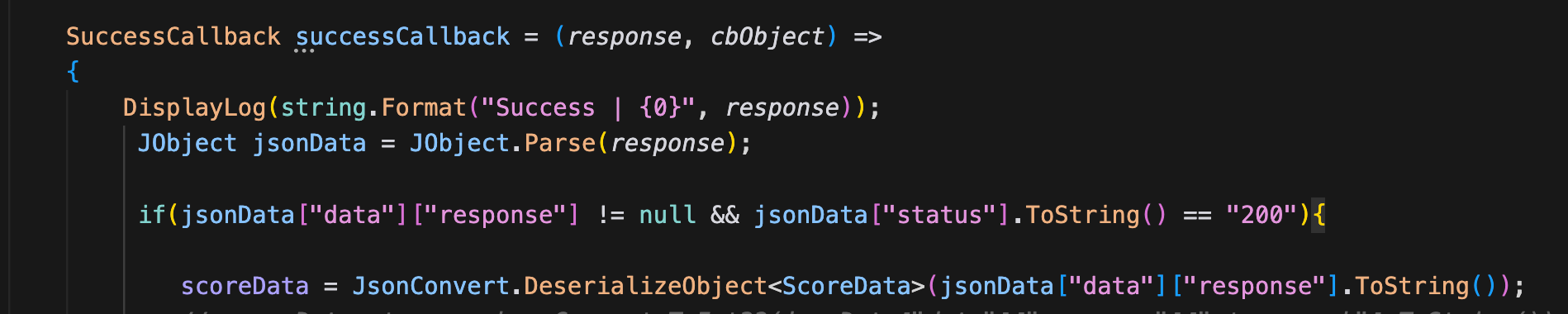
BrainCloud.JsonFx.Json.JsonReaderto deserialize intoDictionary<string, object>and thenBrainCloud.JsonFx.Json.JsonWriterback into astringbefore havingJObject.Parse()use it. This is basically what the old behaviour was and it would strip out trailing.0values from JS Numbers.SuccessCallback successCallback = (response, cbObject) => { response = JsonWriter.Serialize(JsonReader.Deserialize(response)); // Replicate the old BCComms behaviour DisplayLog(string.Format("Success | {0}", response)); JObject jsonData = JObject.Parse(response); if (jsonData["data"]["response"] != null && jsonData["status"].ToString() == "200") { scoreData = JsonConvert.DeserializeObject<ScoreData>(jsonData["data"]["response"].ToString()); // This should be working now as JsonWriter will strip trailing .0 from doubles // ... } // ... }Although you could also just use
JsonReaderinstead ofJsonConvertas this should also strip the trailing.0so you don't have to waste CPU cycles on the serialization/deserialization:scoreData = JsonReader.Deserialize<ScoreData>(jsonData["data"]["response"].ToString());Alternatively you can also bypass using
JObjectsandJsonConvertin this situation and make use of ourBrainCloud.Common.JsonParsertogether withJsonReaderlike so:SuccessCallback successCallback = (response, cbObject) => { DisplayLog(string.Format("Success | {0}", response)); if (JsonParser.GetString(response, "data", "response") is string responseData && !string.IsNullOrEmpty(responseData) && JsonParser.GetValue<int>(response, "status") == 200) // JsonParser can grab strings directly without having to do object memory allocations { scoreData = JsonReader.Deserialize<ScoreData>(responseData); // ... } // ... }I think
JsonParsercan be handy for grabbing strings of json objects, json arrays, and values directly without having to do memory allocations
Let us know if any of these solutions work for you!
-
Hello @LEE-JONG-GUN!
So looking into
JsonConvertit looks like it actually uses LitJson underneath the hoodSo one option to replicate the old functionality is to use
BrainCloud.JsonFx.Json.JsonReaderto deserialize intoDictionary<string, object>and thenBrainCloud.JsonFx.Json.JsonWriterback into astringbefore havingJObject.Parse()use it. This is basically what the old behaviour was and it would strip out trailing.0values from JS Numbers.SuccessCallback successCallback = (response, cbObject) => { response = JsonWriter.Serialize(JsonReader.Deserialize(response)); // Replicate the old BCComms behaviour DisplayLog(string.Format("Success | {0}", response)); JObject jsonData = JObject.Parse(response); if (jsonData["data"]["response"] != null && jsonData["status"].ToString() == "200") { scoreData = JsonConvert.DeserializeObject<ScoreData>(jsonData["data"]["response"].ToString()); // This should be working now as JsonWriter will strip trailing .0 from doubles // ... } // ... }Although you could also just use
JsonReaderinstead ofJsonConvertas this should also strip the trailing.0so you don't have to waste CPU cycles on the serialization/deserialization:scoreData = JsonReader.Deserialize<ScoreData>(jsonData["data"]["response"].ToString());Alternatively you can also bypass using
JObjectsandJsonConvertin this situation and make use of ourBrainCloud.Common.JsonParsertogether withJsonReaderlike so:SuccessCallback successCallback = (response, cbObject) => { DisplayLog(string.Format("Success | {0}", response)); if (JsonParser.GetString(response, "data", "response") is string responseData && !string.IsNullOrEmpty(responseData) && JsonParser.GetValue<int>(response, "status") == 200) // JsonParser can grab strings directly without having to do object memory allocations { scoreData = JsonReader.Deserialize<ScoreData>(responseData); // ... } // ... }I think
JsonParsercan be handy for grabbing strings of json objects, json arrays, and values directly without having to do memory allocationsLet us know if any of these solutions work for you!
    string responseData = JsonParser.GetString(response, "data", "response");
        if (!string.IsNullOrEmpty(responseData) &&    JsonParser.GetValue<int>(response, "status") == 200){

            ScoreData3 scoreData = JsonReader.Deserialize<ScoreData3>(responseData);
            Debug.LogError(scoreData.stage_rank); >>WORKING
            Debug.LogError(scoreData.tier);>>WORKING
We tested using the method you suggested, and with that approach
the double values started coming through as integers correctly.However, another issue appeared because we are using Obscured
Values in our project.When deserializing classes that contain Obscured types, those
fields are not converted correctly with this method.The error we get is:
InvalidCastException: Invalid cast from 'System.String'
to 'CodeStage.AntiCheat.ObscuredTypes.ObscuredString'.If we switch back to using a JsonConverter, the original double
problem happens again.Currently we resolve the Obscured type conversion using:
JsonConvert.DefaultSettings = () =>
new JsonSerializerSettings {
Converters = { new ObscuredTypesNewtonsoftConverter() }
};So my question is: does JsonReader provide a way to apply a
converter globally in a similar way, like JsonConvert.DefaultSettings? -
    string responseData = JsonParser.GetString(response, "data", "response");
        if (!string.IsNullOrEmpty(responseData) &&    JsonParser.GetValue<int>(response, "status") == 200){

            ScoreData3 scoreData = JsonReader.Deserialize<ScoreData3>(responseData);
            Debug.LogError(scoreData.stage_rank); >>WORKING
            Debug.LogError(scoreData.tier);>>WORKING
We tested using the method you suggested, and with that approach
the double values started coming through as integers correctly.However, another issue appeared because we are using Obscured
Values in our project.When deserializing classes that contain Obscured types, those
fields are not converted correctly with this method.The error we get is:
InvalidCastException: Invalid cast from 'System.String'
to 'CodeStage.AntiCheat.ObscuredTypes.ObscuredString'.If we switch back to using a JsonConverter, the original double
problem happens again.Currently we resolve the Obscured type conversion using:
JsonConvert.DefaultSettings = () =>
new JsonSerializerSettings {
Converters = { new ObscuredTypesNewtonsoftConverter() }
};So my question is: does JsonReader provide a way to apply a
converter globally in a similar way, like JsonConvert.DefaultSettings?Hmm, unfortunately I don't believe you can set
JsonReaderto be able to use a converter. In this case you might want to continue usingJsonConvertthen.The first solution I shared where you deserialize & serialize the response to strip out the trailing
.0might be your option here. Additionally, you can also modify your local copy ofBrainCloudComms.csto do this for all responses in-case this situation pops up elsewhere. This will essentially replicate the same behaviour in BC 5.9.2 and older.If that's the route you take you can modify
BrainCloudComms.csin theHandleResponseBundlefunction on line972like so:private void HandleResponseBundle(string jsonData) { jsonData = jsonData.Trim(); if ((jsonData.StartsWith("{") && jsonData.EndsWith("}")) || (jsonData.StartsWith("[") && jsonData.EndsWith("]"))) { jsonData = JsonWriter.Serialize(JsonReader.Deserialize(jsonData)); // This will strip any leading .0 for int values, replicating the behaviour from 5.9.2 }We will have to look into if we should have this be an optional flag that can be enabled for compatibility... Do note though that this will mean that a lot of the memory and performance gains from 5.9.3 will be lost.
There is another option though and that's to leverage
JsonConverterHere's a script that should take floats/doubles during deserialization and convert them to an int. I modified it and tested it, I think it should work for this situation:
using System;
using Newtonsoft.Json;

/// <summary>
/// Converts JSON floating-point numbers (float/double) to int during deserialization.
/// </summary>
public class FloatToIntJsonConverter : JsonConverter<int>
{
    public override int ReadJson(JsonReader reader, Type objectType, int existingValue, bool hasExistingValue, JsonSerializer serializer)
    {
        switch (reader.TokenType)
        {
            case JsonToken.Float:
                return Convert.ToInt32(Math.Round(Convert.ToDouble(reader.Value), MidpointRounding.AwayFromZero));

            case JsonToken.Integer:
                return Convert.ToInt32(reader.Value);

            case JsonToken.String:
                string sVal = reader.Value?.ToString() ?? "0";
                if (double.TryParse(sVal, out double parsed))
                {
                    return Convert.ToInt32(Math.Round(parsed, MidpointRounding.AwayFromZero));
                }

                throw new JsonSerializationException($"Cannot deserialize string to int: {sVal}");

            case JsonToken.Null:
                return 0;

            default:
                throw new JsonSerializationException($"Unexpected token when tryign to deserialize as int: {reader.TokenType}");
        }
    }

    public override void WriteJson(JsonWriter writer, int value, JsonSerializer serializer)
    {
        writer.WriteValue(value);
    }
}
You can apply this to any specific problematic
intlike so:public class ScoreData { [JsonConverter(typeof(FloatToIntJsonConverter))] public int tier; }Of course you can also apply it globally, but that might be a bit riskier to do
 Also note that this script will round floats/doubles to the nearest whole number so if you end up using it make sure to keep that in-mind (or feel free to modify it to suit your needs).
Let us know if either of these work out for you!
-
Hmm, unfortunately I don't believe you can set
JsonReaderto be able to use a converter. In this case you might want to continue usingJsonConvertthen.The first solution I shared where you deserialize & serialize the response to strip out the trailing
.0might be your option here. Additionally, you can also modify your local copy ofBrainCloudComms.csto do this for all responses in-case this situation pops up elsewhere. This will essentially replicate the same behaviour in BC 5.9.2 and older.If that's the route you take you can modify
BrainCloudComms.csin theHandleResponseBundlefunction on line972like so:private void HandleResponseBundle(string jsonData) { jsonData = jsonData.Trim(); if ((jsonData.StartsWith("{") && jsonData.EndsWith("}")) || (jsonData.StartsWith("[") && jsonData.EndsWith("]"))) { jsonData = JsonWriter.Serialize(JsonReader.Deserialize(jsonData)); // This will strip any leading .0 for int values, replicating the behaviour from 5.9.2 }We will have to look into if we should have this be an optional flag that can be enabled for compatibility... Do note though that this will mean that a lot of the memory and performance gains from 5.9.3 will be lost.
There is another option though and that's to leverage
JsonConverterHere's a script that should take floats/doubles during deserialization and convert them to an int. I modified it and tested it, I think it should work for this situation:
using System;
using Newtonsoft.Json;

/// <summary>
/// Converts JSON floating-point numbers (float/double) to int during deserialization.
/// </summary>
public class FloatToIntJsonConverter : JsonConverter<int>
{
    public override int ReadJson(JsonReader reader, Type objectType, int existingValue, bool hasExistingValue, JsonSerializer serializer)
    {
        switch (reader.TokenType)
        {
            case JsonToken.Float:
                return Convert.ToInt32(Math.Round(Convert.ToDouble(reader.Value), MidpointRounding.AwayFromZero));

            case JsonToken.Integer:
                return Convert.ToInt32(reader.Value);

            case JsonToken.String:
                string sVal = reader.Value?.ToString() ?? "0";
                if (double.TryParse(sVal, out double parsed))
                {
                    return Convert.ToInt32(Math.Round(parsed, MidpointRounding.AwayFromZero));
                }

                throw new JsonSerializationException($"Cannot deserialize string to int: {sVal}");

            case JsonToken.Null:
                return 0;

            default:
                throw new JsonSerializationException($"Unexpected token when tryign to deserialize as int: {reader.TokenType}");
        }
    }

    public override void WriteJson(JsonWriter writer, int value, JsonSerializer serializer)
    {
        writer.WriteValue(value);
    }
}
You can apply this to any specific problematic
intlike so:public class ScoreData { [JsonConverter(typeof(FloatToIntJsonConverter))] public int tier; }Of course you can also apply it globally, but that might be a bit riskier to do
Also note that this script will round floats/doubles to the nearest whole number so if you end up using it make sure to keep that in-mind (or feel free to modify it to suit your needs).Let us know if either of these work out for you!
@Michael-Costa
The second option seems too narrow in scope for us, since it would
require us to apply it individually to each affected field, which
is not very practical in our case.With the first approach, the raw response is now being normalized
back to the same format we were seeing in 5.9.2, so we will proceed
with that as our workaround for now.Thank you
-
Symptom
After updating from 5.9.2 to 5.9.3, iOS/iPadOS experiences gradual performance degradation during extended play sessions, eventually leading to app termination
This issue did not occur on 5.9.2
Suspected Code
In BrainCloudComms.cs - HandleResponseBundle, the following line was added in 5.9.3:jsonData = JsonWriter.Serialize(JsonReader.Deserialize(jsonData));
Concerns
This performs a full deserialize → reserialize on every API response
Immediately after, DeserializeJsonBundle parses the same data again — effectively parsing every response twice
Each response generates a large number of temporary objects (Dictionary, List, boxed values, strings) that are immediately discarded
On iOS with IL2CPP (Boehm GC), could this repeated allocation/deallocation pattern cause managed heap growth over time?
Question
Could this code potentially contribute to memory-related issues on iOS during extended play sessions?



Hello! It looks like you're interested in this conversation, but you don't have an account yet.
Getting fed up of having to scroll through the same posts each visit? When you register for an account, you'll always come back to exactly where you were before, and choose to be notified of new replies (either via email, or push notification). You'll also be able to save bookmarks and upvote posts to show your appreciation to other community members.
With your input, this post could be even better 💗
Register Login