
Reconnect to room on a Relay Server
-
Hi,
Is there a way to reconnect a player to a Room, in a Relay Server, after being disconnected (ie: for network problem)? When I try to connect the player the second time, I always get this error:
{"status":403,"reason_code":90300,"status_message":"Relay: Disconnected by server","severity":"ERROR"}.
Thanks!
Alessio
-
Hi Alessio,
You should certainly be able to reconnect to the Relay Server instance - as long as it is still up of course. If you were the last player in a room, it's possible the relay server instance had terminated before you returned?
Out of curiosity - what client lib are you using... Unity? Unreal? Is it our latest libs?
Paul.
-
Also Alessio,
Can we get some more details on your use case - especially in terms of lobby configuration?
i.e. The relay server behaviour for disconnecting users is different depending on your lobby type... i.e. if it's a long-running lobby (i.e. "Disband on start" is false) the relay server sends a SYS_MEMBER_LEFT call to the api server... if it's not, we don't send that call.
More details will help us to better determine what may be happening for you.
Paul.
-
Hello Paul,
this is my scenario:- player A and player B enter the lobby
- the lobby is set to READY and the ROOM_ASSIGNED and ROOM_READY events arrive
- both players enter the ROOM and then start playing
- in the meantime the lobby is DISBANDED ("Disband on start" is true)
- player B disconnects for network reasons, player A receives the notification that the opponent has disconnected
- player B tries to connect again to the room where player A is still present, but receives the error:
{"status":403,"reason_code":90300,"status_message":"Relay: Disconnected by server","severity":"ERROR"}. Player B uses the same access data received from ROOM_ASSIGNED (host, port, passcode)
We are using Unity and the client version of BC is 5.0.0.
Another question: is one server instantiated per ROOM, or can a single server host multiple ROOMs?
Thanks!
Alessio
-
Hi Alessio,
Thanks for the use case clarification - our folks are attempting to replicate the scenario. Certainly the intention is that that reconnect should work - the Relay Server should have the initial collection of members from the lobby cached.
Question - how are you disconnecting "Player B" for network reasons? Would it involve them re-authenticating - and thus getting a new brainCloud session? (If so - that changes the id we call their "cx" - which combines their profileId:sessionId - and is likely the reason the reconnect is failing).
If they were to reconnect without re-authenticating - it would probably work...
(Note - we haven't confirmed that yet - but it's our working theory.)
And to answer your question - yes, a server can host multiple rooms. It is controlled via the "Containers Per Server" property when defining the server on the My Servers page.
Paul.
-
Also Alessio, can you confirm whether your lobby type has the "Allow join in progress" Rule enabled or disabled? That's also relevant. Thanks!
-
Hi Paul & Greg,
-
player B re-authenticates, so I assume that his "cx" changes. Is it possible to ensure that the player can re-enter the room even by re-authenticating? If you have a unique passcode, could you use that?
-
"Allow join in progress" is true
Regarding the number of rooms, so in practice you can have a maximum of 2500 simultaneous rooms (50 "Max servers" x 50 "Containers per Server"), right?
Thank you!
-
-
Hi Alessio,
I think we've identified your test app and lobby. We believe that both
Disband at Start
Allow join in progressare enabled for that lobby. Unfortunately - they shouldn't be - this is a regression in Portal-X - it should be disallowing that combo.
So what we believe is happening is player B is re-authenticating before attempting to re-connect.
Because Player B now has a new session, he/she also has a new connection id (i.e. cx) - and the Relay Server seems them as a new person.
Because "Allow Join in Progress" is enabled - the Relay Server attempts to contact the lobby to see if this user is valid - but that lobby doesn't exist anymore - and we get the error you are seeing... (which is maybe not the best error message).
Disabling "Allow join in progress" will result in a more understandable error message - but probably won't fix the problem.
The real trick to this scenario would be for the network re-connect to the room server to happen without recreating the CX - but depending upon the type of network failure that is probably unavoidable.
The devs are looking into options.
Paul.
-
Thanks Paul, I really appreciate it.
Bear in mind that the player could also disconnect due to a crash or the mobile device being turned off, so the possibility of re-entering the room even after having performed a new authentication would be very very important.Please let me know!
Alessio
-
Also Alessio,
Agreed with your scenario - we are prioritizing a improvement to deal with that scenario for you.
Also that maximum # of servers is a limit that we can control per-app - so we can bump that up.
Paul.
-
Hi @Paul-Winterhalder, any chance to have new developments regarding reconnection in the room?
-
Hi @Alessio-Falsetti - checking with the devs.
I believe we have a short-term Relay Server patch that makes reconnecting generally more reliable -- but also a change for 5.2 that can allow reconnecting across sessions... (that will be an option for the dev to enable).
5.2 is currently targeting mid-to-late February for release.
-
Great! Happy to hear that!
-
Ciao @Paul-Winterhalder, @Greg-Moulds,
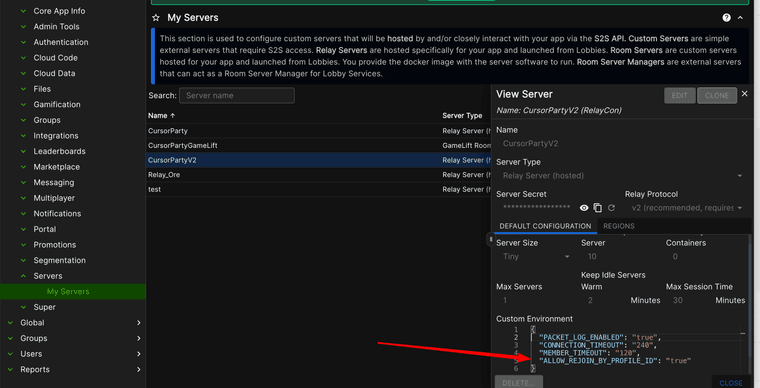
I have updated BC to 5.2, so I can implement the rejoin in the room. But it's not clear to me how to implement it. The only information I found is in the release notes where it only says this:Reconnects - Relay Servers now better handling reconnect scenarios. There is also an option to allow reconnects even if the user’s session has changed ("ALLOW_REJOIN_BY_PROFILE_ID": "true").
How does it work?
Thanks!
-
Hey @Alessio-Falsetti . In order to enable that feature, you need to update the "Custom Environment" settings for the appropriate "My Servers" definition:
-
Hi @Greg-Moulds ,
ok, I've updated the custom environment of my server, and now? If I try to rejoin the room, I receive alway this error:
"status":403,"reason_code":90300,"status_message":"Server Closed Connection","severity":"ERROR"}.I'm using:
RelayService.Connect(RelayConnectionType.TCP, connectionOptions, null, failureCallback);What should I do?
Thanks! -
Hmm...
 Let me poke around.
 -
So a question for you... are you able to connect initially and it's failing on the reconnect? Or are you failing to connect at all?
-
I'm assuming from your statement "if I try to rejoin the room" that you've connected successfully initially.
-
Yes, works well first time.


Hello! It looks like you're interested in this conversation, but you don't have an account yet.
Getting fed up of having to scroll through the same posts each visit? When you register for an account, you'll always come back to exactly where you were before, and choose to be notified of new replies (either via email, or push notification). You'll also be able to save bookmarks and upvote posts to show your appreciation to other community members.
With your input, this post could be even better 💗
Register Login