
Request: Improve Leaderboard Editing UX (Success Popup Blocks Buttons)

-
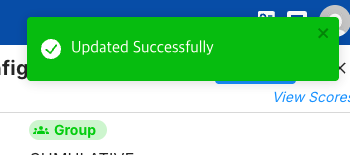
When updating multiple leaderboards consecutively, the current UX becomes quite inconvenient.
Each time a leaderboard is updated, an “Updated Successfully” popup appears. The issue is that this popup shows up in the top-right area, which is also where the Edit buttons and most of the controls are located.
Because of this, the popup covers the edit buttons, and instead of continuing the workflow, the user has to close the popup first before editing the next leaderboard. When several leaderboards need to be updated in sequence, this becomes unnecessarily repetitive and slows down the process.
It would significantly improve usability if one of the following changes could be considered:
Move the success notification to a less intrusive location (for example, bottom-right or top-center of the screen).
Make the notification non-blocking, so it does not cover important UI elements.
Add the ability to edit multiple leaderboards at once, instead of updating them one by one.
Currently, since most of the actionable UI is concentrated in the top-right corner, displaying notifications in the same area creates unnecessary friction for tasks that require repeated edits.
This small UX change would make managing multiple leaderboards much more efficient.
-
What sort of edits are you doing to the leaderboards that updating multiple of them at the same time would be appropriate / convenient?
-
There are multiple leaderboards in the game separated by region, but aside from the region itself, they all use the same settings.
When creating them initially, cloning works fine. However, after they have been created, if I need to adjust various options, I have to edit each leaderboard one by one.
The main problem is that every time I save a change, the “Updated successfully” popup appears and covers the edit button, which makes consecutive edits across multiple leaderboards very inconvenient.
It would be much more efficient if there were a way to edit multiple leaderboards with identical settings at the same time. At the very least, moving the success popup to a location where it does not block the button would greatly improve usability.

Hello! It looks like you're interested in this conversation, but you don't have an account yet.
Getting fed up of having to scroll through the same posts each visit? When you register for an account, you'll always come back to exactly where you were before, and choose to be notified of new replies (either via email, or push notification). You'll also be able to save bookmarks and upvote posts to show your appreciation to other community members.
With your input, this post could be even better 💗
Register Login