
[Unity] Registering push notifications specifically for Async turns.
-
My game only needs to send push notifications when the matched player has completed their turn in ASYNC match. I know the SubmitTurn function has an argument for push notification message. So how do I register just for this notification. The docs have information about sending our own push notifications which isn't needed for my game at the moment.
Thanks in advance! -
Hi @immortal-ray-dev,
Is your game online or offline? If it's online - it's better to enable RTT - and then receive the events that are sent as players make their turns. You register for the generic event handler to receive those events.
https://docs.braincloudservers.com/api/capi/rtt/registerrtteventcallbackThe Push Notification capability is used mostly for cosmetic push notifications - which have the advantage of causing the user to launch back into the app. The brainCloud client doesn't have a handler for those - you'd have to use the platform-specific (i.e. ios vs. android, etc.) to receive those messages.
I hope this helps!
Paul.
-
Hi @immortal-ray-dev,
Is your game online or offline? If it's online - it's better to enable RTT - and then receive the events that are sent as players make their turns. You register for the generic event handler to receive those events.
https://docs.braincloudservers.com/api/capi/rtt/registerrtteventcallbackThe Push Notification capability is used mostly for cosmetic push notifications - which have the advantage of causing the user to launch back into the app. The brainCloud client doesn't have a handler for those - you'd have to use the platform-specific (i.e. ios vs. android, etc.) to receive those messages.
I hope this helps!
Paul.
@Paul-Winterhalder The users can be offline. One user plays their turn and exits the game. After the opponent plays their turn, the offline user should receive push notification to launch the game and play their turn.
RTT in enabled and works as expected. When both users are online, the match status is updated correctly. I need the push notification sent when the offline user has to play their turn. The docs were helpful but I'm a little lost on how to enable it so that the user receives a simple "Your opponent has played their turn. You turn now!" notification after the following code is called.
AsyncMatchService.SubmitTurn( currentMatch.ownerId, currentMatch.matchId, (ulong)currentMatch.version, JsonWriter.Serialize(matchState), "Your opponent has played their turn. You turn now!", // Push notif message currentMatch.matchedProfile.ProfileId, null, null, OnSubmitSuccess, OnSubmitFailure ); -
Ah - okay - the process of setting your app for push notifications depends a lot on the platform. From a brainCloud API perspective - you need to register the push notification device token with brainCloud. That's done via this method:
https://docs.braincloudservers.com/api/capi/pushnotification/registerpushnotificationdevicetokenBut first - you need to set up push notification services for your app with the the iOS App Store or Google Play store. These tutorials will help:
- iOS - https://docs.braincloudservers.com/learn/portal-tutorials/push-notification-configuration-ios/
- Android - https://docs.braincloudservers.com/learn/portal-tutorials/push-notification-setup-firebase/
I hope that helps!
Paul.
-
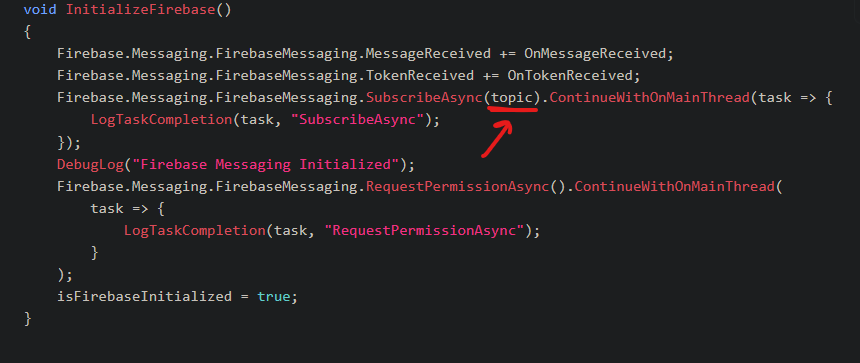
@Paul-Winterhalder Thank you. Just one question. What is the topic variable in Firebase docs in the link you sent?
-
Hi @immortal-ray-dev ,
I think that line for subscribing to topics wouldn't be necessary to receive the brainCloud push notifications... we send them directly to the users via the device tokens. Try eliminating it...
(We're checking on our end as well - will remove from the example if unnecessary).
Paul.


Hello! It looks like you're interested in this conversation, but you don't have an account yet.
Getting fed up of having to scroll through the same posts each visit? When you register for an account, you'll always come back to exactly where you were before, and choose to be notified of new replies (either via email, or push notification). You'll also be able to save bookmarks and upvote posts to show your appreciation to other community members.
With your input, this post could be even better 💗
Register Login