Skip to content
  • Categories
  • Recent
  • Tags
  • Popular
  • Solved
  • Unsolved
  • Users
Skins
  • Light
  • Brite
  • Cerulean
  • Cosmo
  • Flatly
  • Journal
  • Litera
  • Lumen
  • Lux
  • Materia
  • Minty
  • Morph
  • Pulse
  • Sandstone
  • Simplex
  • Sketchy
  • Spacelab
  • United
  • Yeti
  • Zephyr
  • Dark
  • Cyborg
  • Darkly
  • Quartz
  • Slate
  • Solar
  • Superhero
  • Vapor

  • Default (Darkly)
  • No Skin
Collapse
brainCloud Forums
  1. Home
  2. General
  3. Early access - Visual Studio Code extension!

Early access - Visual Studio Code extension!
Scheduled Pinned Locked Moved Unsolved General
visual studioextensionide
10 Posts 6 Posters 2.1k Views 6 Watching
  • Oldest to Newest
  • Newest to Oldest
  • Most Votes
Reply
  • Reply as topic
Log in to reply
This topic has been deleted. Only users with topic management privileges can see it.
  • Paul WinterhalderP Offline
    Paul WinterhalderP Offline
    Paul Winterhalder
    brainCloudAdmin
    wrote on last edited by
    #1

    Hi folks,

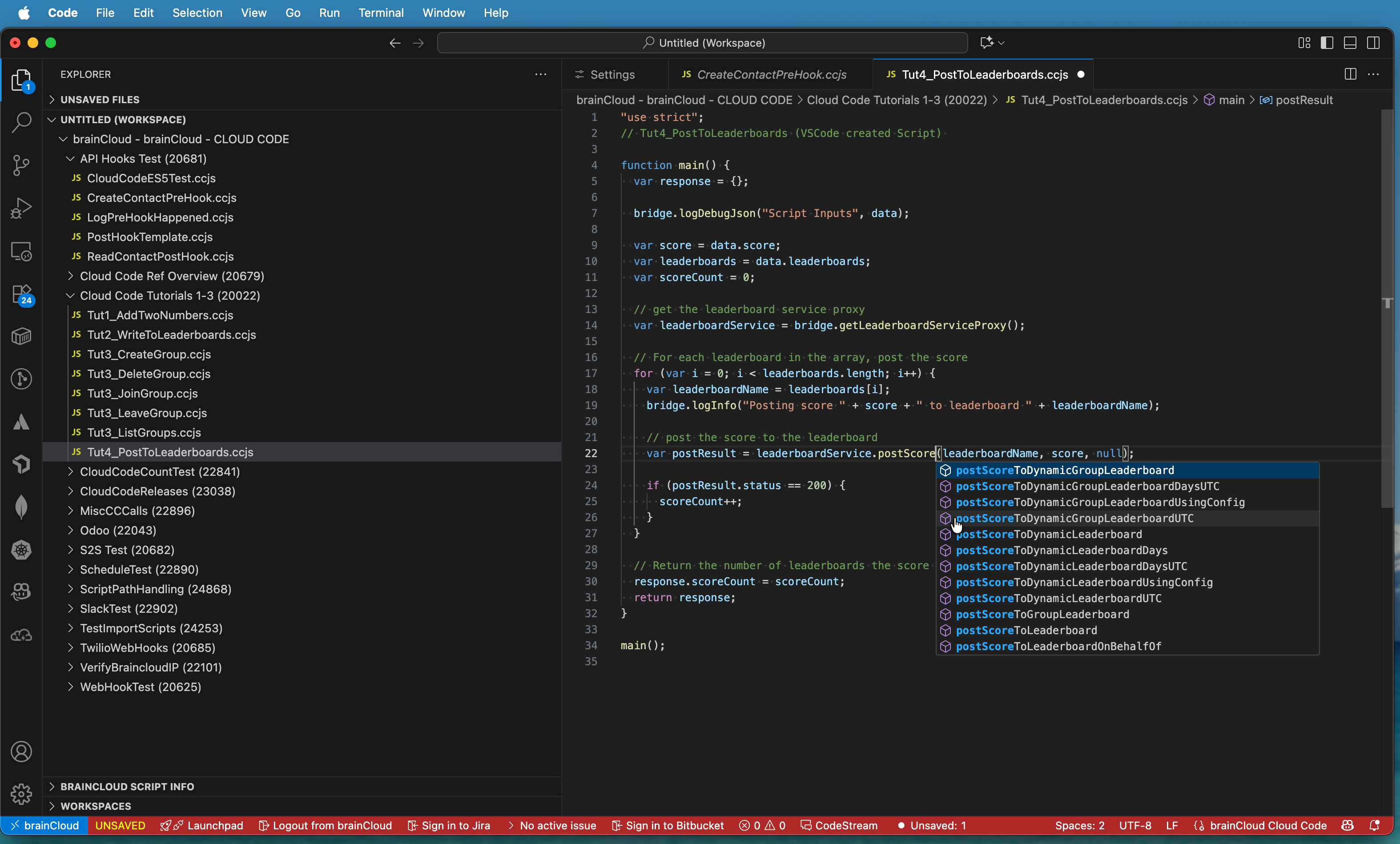
    We are pleased to announce the Early Access availability of our new Visual Studio Code plug-in.
    https://marketplace.visualstudio.com/items?itemName=braincloud.vscode-bccfs
    2025-10-01_17-37-55.png

    As you would expect, this plug-in enables developers to create and edit cloud code scripts directly from the comfort of their Visual Studio Code IDE.

    Key capabilities:

    • Connect to a Team; Switch Teams
    • View all apps (that the developer has access to)
    • View/edit/delete cloud code scripts of each app
    • Create new scripts (script names must have an extension of .ccjs)
    • Create new folders (folder names must be all lowercase)
    • Supports Intellisense for brainCloud API
    • Allows devs to edit the script metadata (example parameters, timeouts)

    Integrating with Visual Studio Code enables developers to leverage the advanced capabilities of that IDE, such as refactoring and AI assistance! (Note - the AI suggestions aren't always right - but they will hopefully get better!)

    Also note that the extension does not support running the scripts from the IDE. You still need the brainCloud Portal for that!

    Key requirements:

    • Public BaaS and/or Private instances supported
    • For connecting to brainCloud Platform version 5.8 or higher
    • Uses brainCloud SSO and our Builder API to establish an API connection.
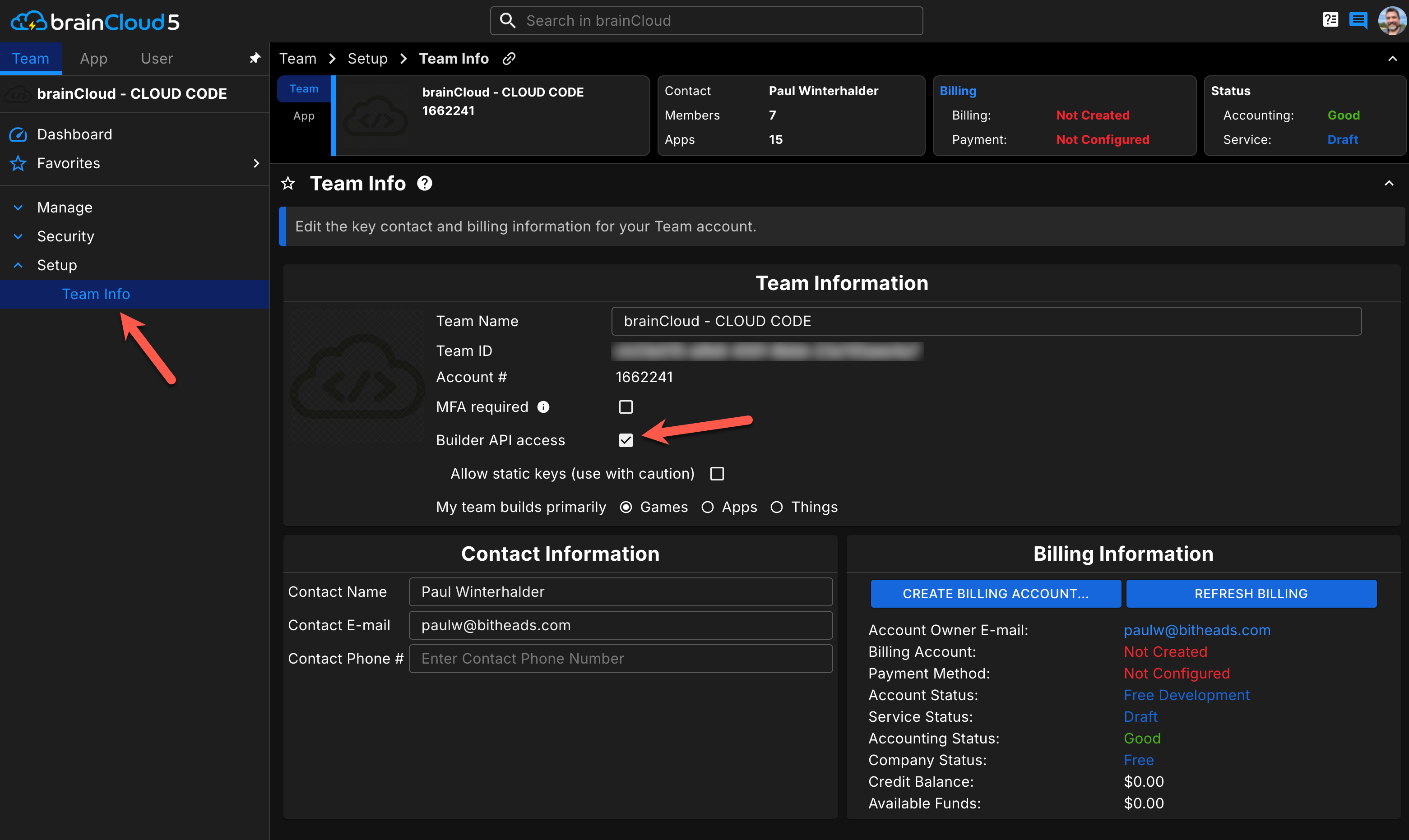
    • "Builder API Access" must be enabled from the Team > Setup > Team Info menu. Does NOT require Static API Keys.
    • Developer must have write access to the App > Design > Cloud Code > Scripts page
    2025-10-01_17-21-11.png

    Troubleshooting tips:

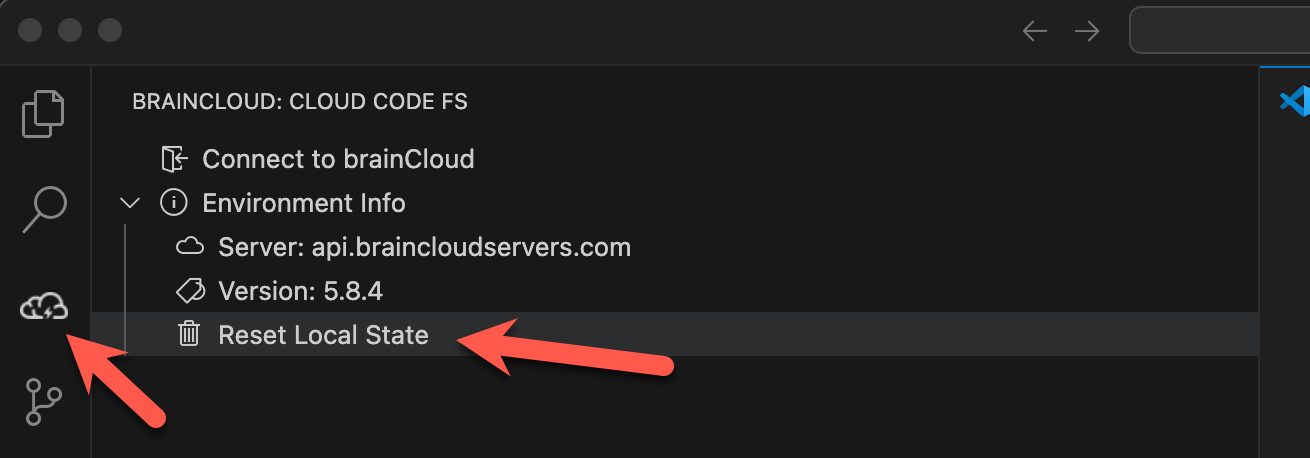
    • If you get into a weird state, click on the brainCloud extension, expand the "Environment Info" section, and click "Reset Local State". Don't worry - it only affects the local IDE state. All your scripts on brainCloud are still saved - you'll need to log in again.
      2025-10-01_18-43-36.png

    Anyway - give it a test run and let us know what you think!

    Paul.

    1 Reply Last reply
    1
    • devsleeperD Offline
      devsleeperD Offline
      devsleeper
      wrote on last edited by
      #2

      No way, I was just browsing for exactly this..

      Cheers guys!

      1 Reply Last reply
      2
      • Paul WinterhalderP Offline
        Paul WinterhalderP Offline
        Paul Winterhalder
        brainCloudAdmin
        wrote on last edited by
        #3

        @devsleeper - we hope you like it! 🙂

        1 Reply Last reply
        0
        • V Offline
          V Offline
          vinicius.pacha
          wrote on last edited by
          #4

          Hey! The extension is working and I can see my scripts but I don`t understand how can I test and run the scripts from VS Code is it possible? Thank you in advance

          1 Reply Last reply
          0
          • Paul WinterhalderP Offline
            Paul WinterhalderP Offline
            Paul Winterhalder
            brainCloudAdmin
            wrote on last edited by
            #5

            Hi Vinicius,

            You currently can't "run" scripts from the Code extension (I know - boo!).

            For now the simplest is to keep a portal window up on the debug screen - and just switch and run the script from there upon save. Note that you don't need to load fresh script contents or anything - the servers automatically run the latest version - even if it's not currently what's showing in the Portal editor screen...

            [Note - there are improvements to the Portal script editor coming in 5.9 - so that it's windows update more quickly and more reliably if the script has been edited elsewhere <-- exactly for this use case].

            Paul.

            1 Reply Last reply
            0
            • A Offline
              A Offline
              Alessio Falsetti
              wrote on last edited by
              #6

              Finally! I've been waiting for this for years. I love this plugin. 😎​

              1 Reply Last reply
              0
              • W Offline
                W Offline
                william
                wrote on last edited by
                #7

                Glad to see this! Are there any plans to support Jetbrains Rider IDE as well?

                1 Reply Last reply
                0
                • Paul WinterhalderP Offline
                  Paul WinterhalderP Offline
                  Paul Winterhalder
                  brainCloudAdmin
                  wrote on last edited by
                  #8

                  Hi @william - for now we'll stay focused on Visual Studio Code... but never say never! 🙂

                  1 Reply Last reply
                  0
                  • C Offline
                    C Offline
                    c.desplanches 0
                    wrote on last edited by
                    #9

                    Thanks for this extension, very useful.
                    Any chance to add support for git?

                    1 Reply Last reply
                    0
                    • Paul WinterhalderP Offline
                      Paul WinterhalderP Offline
                      Paul Winterhalder
                      brainCloudAdmin
                      wrote on last edited by
                      #10

                      We are very interested in doing it - just need to find a model that works and is reliable...

                      1 Reply Last reply
                      0
                      • J JasonL referenced this topic on

                      Hello! It looks like you're interested in this conversation, but you don't have an account yet.

                      Getting fed up of having to scroll through the same posts each visit? When you register for an account, you'll always come back to exactly where you were before, and choose to be notified of new replies (either via email, or push notification). You'll also be able to save bookmarks and upvote posts to show your appreciation to other community members.

                      With your input, this post could be even better 💗

                      Register Login
                      Reply
                      • Reply as topic
                      Log in to reply
                      • Oldest to Newest
                      • Newest to Oldest
                      • Most Votes


                      • Login

                      • Login or register to search.
                      • First post
                        Last post
                      0
                      • Categories
                      • Recent
                      • Tags
                      • Popular
                      • Solved
                      • Unsolved
                      • Users