
Is Meta Quest Fully Supported?
-
Hello!
I'm wondering if the Meta Quest platform is fully supported by brainCloud?
I just signed up for brainCloud and I'm currently learning about it, reading docs, and messing around in the dashboard to see if it will work for my use case.
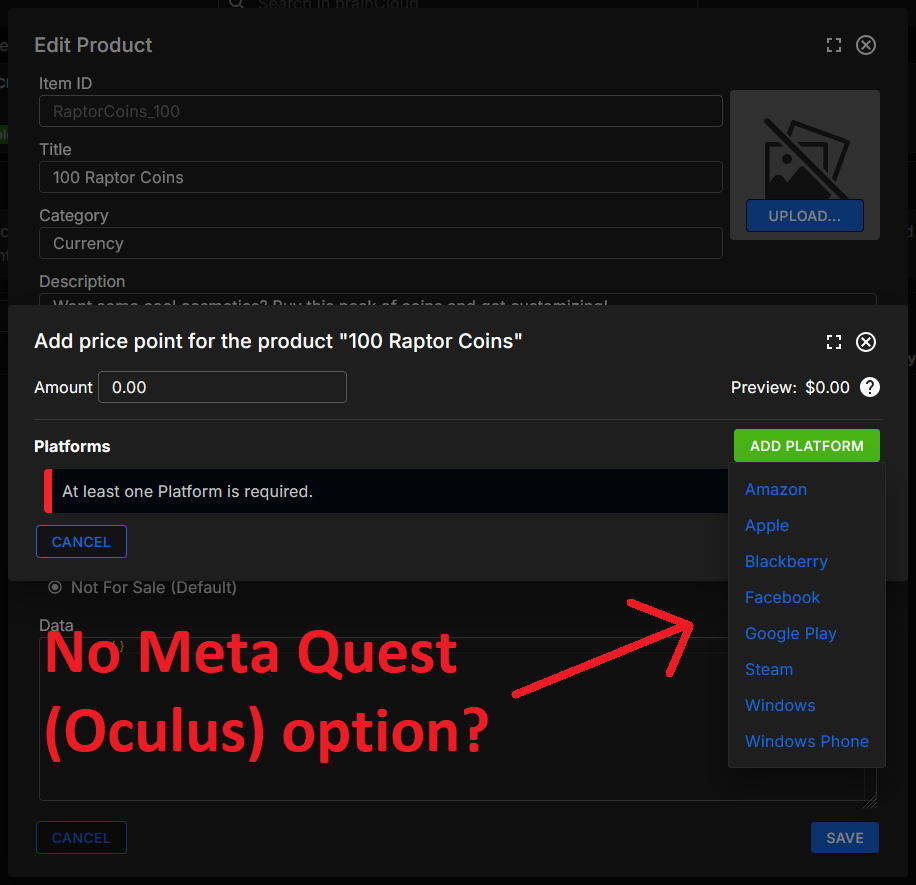
My primary platform is Meta Quest (formerly Oculus). I see that brainCloud supports Oculus in the dashboard and I've put in the API info, however when I attempt to make a product and set a price point, I don't see "Oculus" as an option? I only see Facebook, which of course is different than the Meta Quest platform.
So, I am wondering if Meta Quest is 100% supported by brainCloud or what caveats exist?
-
Hi,
Oculus authentication is supported.
The devs are currently gearing up to add IAP support for the Meta Horizon store.
I hope that helps!
Paul.
-
Hi,
Oculus authentication is supported.
The devs are currently gearing up to add IAP support for the Meta Horizon store.
I hope that helps!
Paul.
@Paul-Winterhalder Hi Paul, I saw your response as soon as you posted it but just wanted to follow up and say thank you! Do you have any timeline on the updated support for Meta Quest / Meta Horizon Store IAPs?
I am going to try implementing the brainCloud Unity client library soon, so updated support for Meta Quest would be incredibly appreciated!
By the way, I was just at Meta Connect and was spreading the word about brainCloud to other VR devs there. I think that brainCloud would be useful for a lot of Meta Quest developers, so I am really looking forward to updated support for this platform.

-
Hello @Paul-Winterhalder, I'm trying to implement Oculus authentication but it does not appear to work. I'm using Unity and I've watched the Unity Bootcamp series. I am looking at this guide for how to implement Oculus authentication: https://docs.braincloudservers.com/learn/portal-tutorials/authentication-oculus/
When I call
AuthenticateOculusfollowing the instructions in the guide, I get the following error:[BrainCloudClient] AuthenticateOculus failed. Error: 400, StatusCode: 40320, ReasonCode: {"status_message":"Processing exception (message): Platform ANG has not been enabled for this app","reason_code":40320,"status":400}Do you know what the platform "ANG" means? Here is the request being sent by the Unity client:
{
    "packetId": 0,
    "sessionId": "",
    "gameId": "REDACTED",
    "messages": [
        {
            "service": "authenticationV2",
            "operation": "AUTHENTICATE",
            "data": {
                "externalId": "REDACTED",
                "authenticationToken": "REDACTED",
                "authenticationType": "Oculus",
                "forceCreate": true,
                "compressResponses": true,
                "profileId": "",
                "anonymousId": "REDACTED",
                "gameId": "REDACTED",
                "releasePlatform": "ANG",
                "gameVersion": "Quest.2025.09.26.001",
                "clientLibVersion": "5.8.0",
                "clientLib": "csharp-unity",
                "countryCode": "US",
                "languageCode": "en",
                "timeZoneOffset": -6
            }
        }
    ]
}
As you can see, the request is including a
releasePlatformof "ANG" when attempting to authenticate Oculus. I would have expected this to be "Oculus". What does "ANG" mean?A second issue is that in the Design Portal under Design > Core App Info > Platforms there is no entry for the "Oculus" platform for me to enable it. To my understanding, I would need to enable an "Oculus" platform in this menu for things to work, right? Is this an issue with brainCloud, or is this by design for some reason?
-
In case you didn’t see Paul’s reply in the chat widget,
ANGjust means Google Android in brainCloud, so you’ll need to enable theGoogle Androidplatform setting.@JasonL @Paul-Winterhalder Thanks for your help, the error no longer appears after the Google Android platform was enabled.

Hello! It looks like you're interested in this conversation, but you don't have an account yet.
Getting fed up of having to scroll through the same posts each visit? When you register for an account, you'll always come back to exactly where you were before, and choose to be notified of new replies (either via email, or push notification). You'll also be able to save bookmarks and upvote posts to show your appreciation to other community members.
With your input, this post could be even better 💗
Register Login