Skip to content
  • Categories
  • Recent
  • Tags
  • Popular
  • Solved
  • Unsolved
  • Users
Skins
  • Light
  • Brite
  • Cerulean
  • Cosmo
  • Flatly
  • Journal
  • Litera
  • Lumen
  • Lux
  • Materia
  • Minty
  • Morph
  • Pulse
  • Sandstone
  • Simplex
  • Sketchy
  • Spacelab
  • United
  • Yeti
  • Zephyr
  • Dark
  • Cyborg
  • Darkly
  • Quartz
  • Slate
  • Solar
  • Superhero
  • Vapor

  • Default (Darkly)
  • No Skin
Collapse
brainCloud Forums
  1. Home
  2. General
  3. Coming in brainCloud 5.2 - refactored Script Editor!

Coming in brainCloud 5.2 - refactored Script Editor!

Scheduled Pinned Locked Moved Unsolved General
4 Posts 2 Posters 1.5k Views 2 Watching
  • Oldest to Newest
  • Newest to Oldest
  • Most Votes
Reply
  • Reply as topic
Log in to reply
This topic has been deleted. Only users with topic management privileges can see it.
  • Paul WinterhalderP Offline
    Paul WinterhalderP Offline
    Paul Winterhalder
    brainCloudAdmin
    wrote on last edited by
    #1

    Hi,

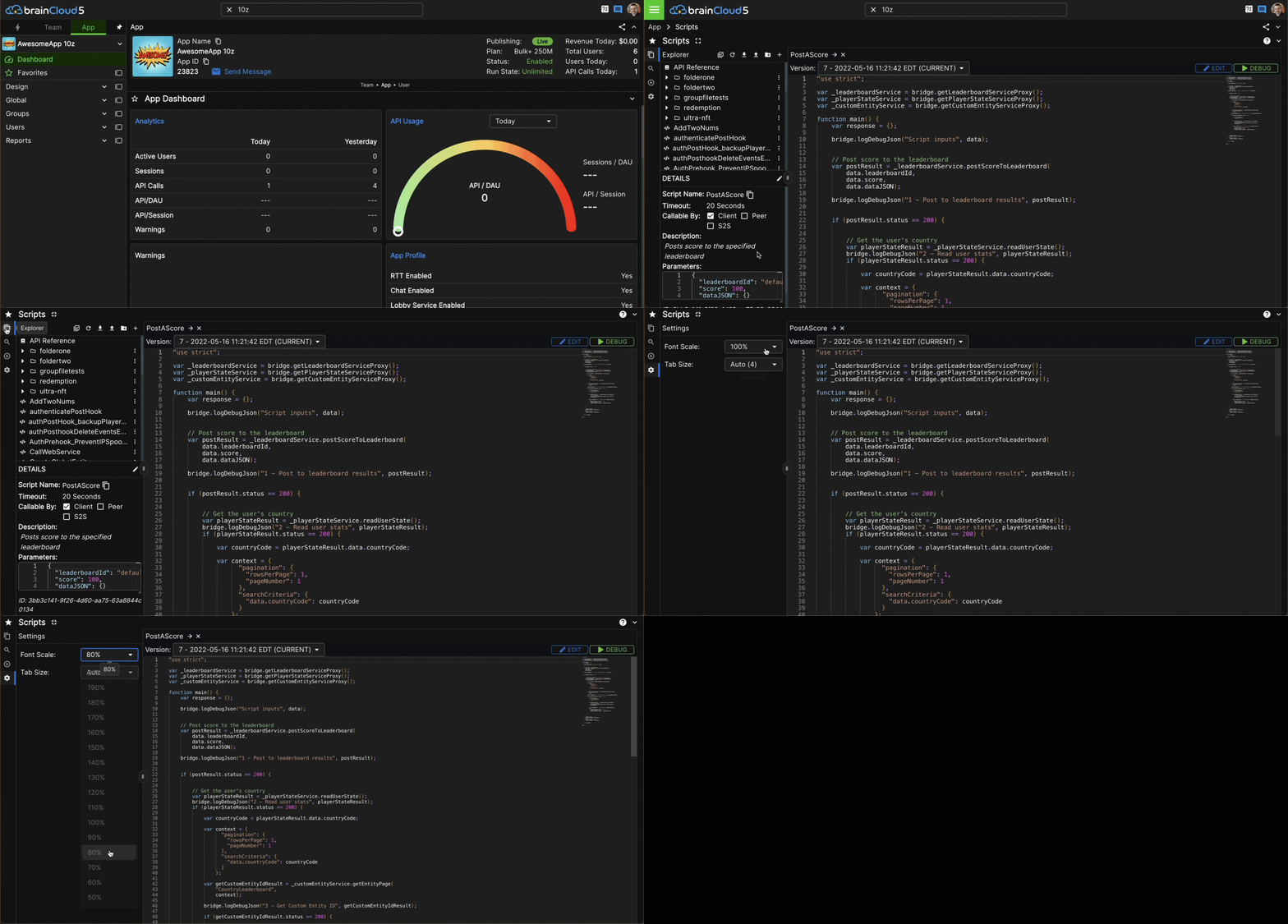
    We've redesigned our script editor again to be more useful for folks with smaller (i.e. laptop) screens.

    This is coming to our Public BaaS next week as part of brainCloud 5.2!

    We hope you like it.

    Paul.
    2024-02-16_08-38-55 (1).gif

    1 Reply Last reply
    1
    • Paul WinterhalderP Offline
      Paul WinterhalderP Offline
      Paul Winterhalder
      brainCloudAdmin
      wrote on last edited by
      #2

      No comments on the updated layout?

      Like? Dislike?

      1 Reply Last reply
      0
      • P Offline
        P Offline
        Panagiotis Milios
        wrote on last edited by Panagiotis Milios
        #3

        I have a pretty large screen so i didn't see any difference in 5.2. But from the above gif, i just realised the existence of the menu on the left side of the cloud code editor.

        I mean this (Unless it was added in 5.2 which then it's great)

        Screenshot_9.png

        For debug, i was just using the button on top right.

        I think you should apply some color to the images of the above menu as well as the one in the image below to add some emphasis.

        Screenshot_8.png

        Also, the font scale as well as tab size for the cloud code editor are great options that didn't know they existed

        1 Reply Last reply
        0
        • Paul WinterhalderP Offline
          Paul WinterhalderP Offline
          Paul Winterhalder
          brainCloudAdmin
          wrote on last edited by
          #4

          Hi Panagiotis,

          Thanks for the feedback!

          That vertical icon bar on the far left is new in 5.2. It was key to allowing us to free up more space - moving the Debug + Log screens to their own pane. (i.e. now the screen is only ever split vertically in 2 - instead of sometimes split into 4 pains - 2 verticle and 2 horizontal).

          The font scale and tab size options were there before too - but are somewhat more discoverable now that we have that cog wheel.

          Glad you like the changes!

          1 Reply Last reply
          0

          Hello! It looks like you're interested in this conversation, but you don't have an account yet.

          Getting fed up of having to scroll through the same posts each visit? When you register for an account, you'll always come back to exactly where you were before, and choose to be notified of new replies (either via email, or push notification). You'll also be able to save bookmarks and upvote posts to show your appreciation to other community members.

          With your input, this post could be even better 💗

          Register Login
          Reply
          • Reply as topic
          Log in to reply
          • Oldest to Newest
          • Newest to Oldest
          • Most Votes


          • Login

          • Login or register to search.
          • First post
            Last post
          0
          • Categories
          • Recent
          • Tags
          • Popular
          • Solved
          • Unsolved
          • Users